
You can have the perfect ICP list and the sharpest outreach scripts — but if LinkedIn shuts down your account, none of that matters.
Once your profile gets restricted, you lose your network, your message history, and often the months (or years) you spent building it. Recovery is messy — sometimes impossible.
That’s why safe outreach setup isn’t optional. It’s the foundation.
This playbook is based on hundreds of B2B campaigns we’ve run at Sally, both for ourselves and our clients. It’s everything we’ve learned about keeping accounts safe while still generating replies and deals.
1. Prepare your profile before you start
Before sending your first invite, LinkedIn needs to see you as a real, trusted account. That means:
A professional photo and cover image.
A clear headline with your value proposition.
At least 50–70 connections.
Visible activity (likes, comments, posts).
An improving SSI (Social Selling Index) score.
The higher your “trust score,” the more freedom you get. New or inactive accounts are the first to be flagged.
👇 Here’s a full guide on profile setup and warm-up.

2. Choose the right automation tools
For outreach, we only use browser-based tools — they mimic real human behavior: mouse movement, clicks, pauses between actions. LinkedIn is much less likely to detect them as automation.
✅ Trusted: Waalaxy, GetSales, LinkedHelper
❌ Avoid: API-based tools, “grey” software, random free extensions.
Why? Because LinkedIn spots anomalies. If your account suddenly sends hundreds of requests per minute, you’ll get flagged.
3. Set up proxies and IP hygiene
Golden rule: one LinkedIn account = one stable IP address.
The best option is static residential or static datacenter proxies. These lock in one IP address for you, so LinkedIn sees a consistent login location, which builds trust.
Rotating residential proxies use real users’ IP addresses but switch them automatically every X seconds or requests. LinkedIn will see you logging in from constantly changing locations and may flag it as suspicious. These proxies are great for scraping large amounts of data (thousands of rows from different pages) but unsafe for outreach — the IP changes every few requests, and LinkedIn will spot the inconsistency instantly.
We use the Dolphin anti-detect browser (10 free profiles to start).
For proxies, we use several trusted providers that cover a wide range of geos:
Belurk — offers short-term rentals at lower prices.
We also use built-in proxies from the outreach service GetSales. They provide a dedicated IP for the account in almost any location, which is useful for region-specific campaigns.
4. Follow limits and track conversion rates
LinkedIn has weekly limits for sending connection requests. These depend on your subscription plan and the age of your account: Free ~100, Premium 150–200, Sales Nav 200–250 per week). But the real limiter is SSI.
But mostly we use an internal SSI-based calculator to define safe sending limits:
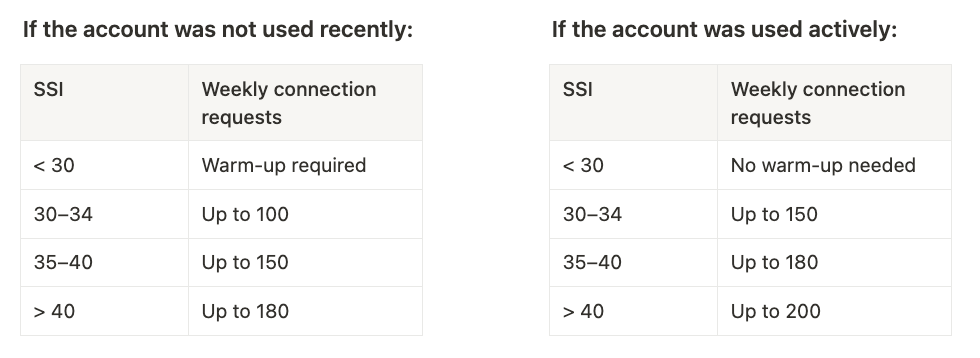
Additional rules:
Keep accept rate (accepted invites ÷ sent invites) at 20–25%. Below 10%, LinkedIn may flag your activity as spam.
Don’t exceed 250 total actions per day (connections, messages, profile views combined).
Increase activity gradually: start with 10–15 actions/day in week 1.
Keep pending invitations under 1,000 — clean them up every couple of weeks.
Avoid sending bulk invites during holidays or at midnight — these patterns can trigger restrictions.
5. Why pay for Premium or Sales Navigator
Subscriptions are not just “nice to have” — they help maintain both safety and efficiency:
Higher trust score. Paid users are less likely to be restricted and enjoy more freedom.
More invites. Higher weekly connection limits compared to free accounts.
Advanced search. Sales Navigator unlocks better filters and segmentation for more relevant targeting. Combined with data enrichment tools (Clay, Apollo, etc.), this can significantly improve results.
InMail access. Message people who don’t accept connections — an additional way to reach key leads.
From our experience, pairing Premium or Sales Navigator with a warmed-up profile offers the best balance between volume and safety.
Final takeaway
Keeping your LinkedIn account safe comes down to a few principles:
Build trust with a complete, active profile.
Use the right tools and stable proxies.
Respect SSI-based limits.
Watch your accept rate and daily actions.
Act fast (and politely) if restrictions happen.
Outreach is a long game. Treat your profile like an asset, not a disposable account — and it will keep bringing leads for years, not days.
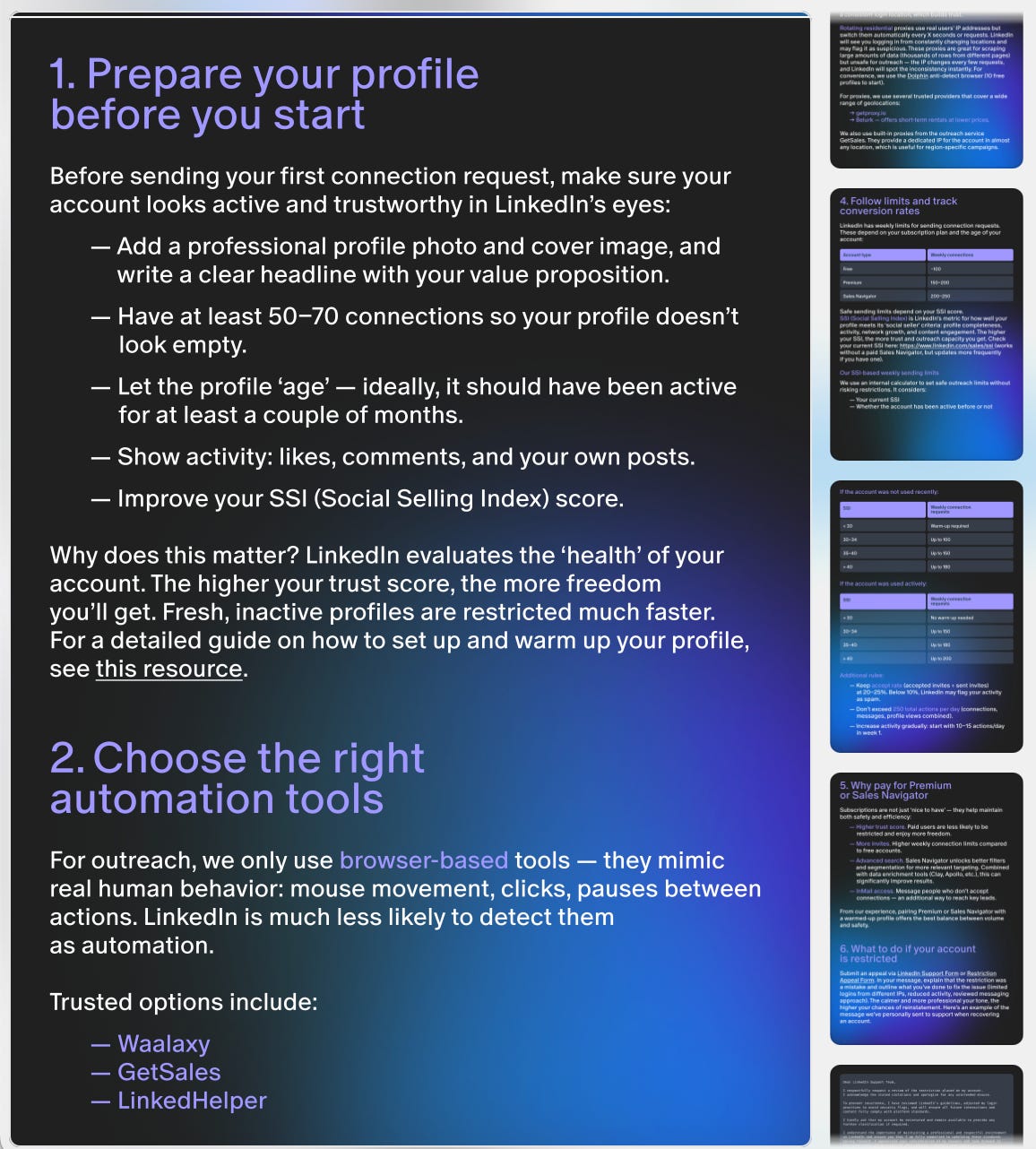
📌 Save a copy of this guide to your Notion
📋 Or download a PDF to share with a team (there’s a bonus part about getting your profile out of ban)

✉️ Liked this guide? Stay for more practical playbooks on outbound, scripts, and teardown cases.
P.S. If you're building outbound right now (or wondering why yours isn’t converting), grab 30 min on my calendar. Always happy to compare notes.
📚 Want more context before we chat?
Explore case studies from fintech, SaaS, and enterprise teams — and see how structured outbound actually scales.
